From Agent Demo to Production Confidence: Evaluating Google ADK Agents
A concept-first guide to evaluating AI agents locally with Google ADK and at scale with Gemini Enterprise Agent Platform.

Building an AI agent is relatively easy. Proving that it behaves reliably across different users, tool calls, and multi-turn conversations is much harder.
A normal application test can verify that a function returned the expected value. An agent test must answer a broader set of questions:
- Did the agent understand the user’s goal?
- Did it choose the correct tool?
- Were the tool parameters correct?
- Did it call tools in a safe and logical order?
- Did it use the returned data accurately?
- Was the final answer useful, grounded, and safe?
- Can it recover when the user changes direction or a tool fails?
This is why agent evaluation must inspect both the outcome and the path used to reach it.
In this article, I explain a two-layer evaluation approach using Google’s Agent Development Kit (ADK) and Gemini Enterprise Agent Platform:
- Evaluate an agent locally during development with ADK.
- Evaluate a deployed agent at scale with managed scenarios, simulated users, traces, and failure analysis.
The accompanying implementation will be available in my GitHub repository:
GitHub:
https://github.com/sdavidraj/agent-eval-gcp.git
The core idea: evaluate the journey and the destination
An agent does more than generate text. It observes the conversation, decides what to do, invokes tools, interprets their results, and then responds. ADK describes this sequence of actions as the agent’s trajectory.
For example, consider a travel-support agent asked to change a flight:
flowchart LR
    accTitle: Travel-support agent workflow
accDescr: Understand the request, retrieve the booking, check alternatives, ask for confirmation, modify the booking, and return confirmation.
    A("Understand request") --> B("Retrieve booking")
    B --> C("Check alternatives")
    C --> D("Ask for confirmation")
    D --> E("Modify booking")
    E --> F("Return confirmation")
    classDef approval fill:#123b5d,color:#ffffff,stroke:#123b5d
    class D approval
The final response could look correct even if the agent skipped the confirmation step, used the wrong booking ID, or claimed that a change was completed without calling the booking tool. Evaluating only the prose would miss those failures.
Google’s ADK evaluation guidance therefore divides agent evaluation into two broad dimensions:
| Dimension | What it examines | Example failure |
|---|---|---|
| Trajectory and tool use | The tools selected, parameters passed, order of operations, and intermediate behavior | Booking a flight before obtaining user confirmation |
| Final response | Correctness, relevance, quality, safety, and grounding | Claiming a refund was issued when the tool failed |
This distinction is one of the most important concepts in agent engineering. A good answer produced through an unsafe path is not a successful result.
Layer 1: local evaluation with ADK
Google ADK is an open-source, code-first framework for developing agents. Its evaluation framework lets developers create repeatable test cases and run them while prompts, tools, and orchestration logic are still changing.
Local evaluation is the agent equivalent of unit and regression testing. It provides a fast feedback loop before deployment and should be part of normal development—not a final activity performed just before release.
What is an evaluation case?
An evaluation case represents a scenario the agent must handle. Depending on the test, it can include:
- The user’s message or a sequence of messages
- Initial session state or conversation context
- Expected tool calls and parameters
- Expected intermediate responses
- A reference final answer
- Rubrics describing acceptable behavior
A single case might verify that a customer-service agent retrieves a reservation before answering a cancellation question. A multi-turn case might test whether the agent asks for missing dates, handles a user changing the destination, and completes the task without losing earlier context.
The objective is not to prescribe every word the model must produce. It is to make the important behavioral expectations measurable.
Deterministic and model-based metrics
ADK supports several evaluation criteria. They fall into three practical groups.
1. Reference and trajectory metrics
These compare the run with an expected result.
| Metric | Purpose | Best use |
|---|---|---|
tool_trajectory_avg_score |
Compares actual tool calls with the expected trajectory | Deterministic workflows and regression gates |
response_match_score |
Uses ROUGE-1 word overlap against a reference response | Stable, tightly constrained answers |
final_response_match_v2 |
Uses an LLM judge to check semantic equivalence with a reference | Correct answers that may be phrased differently |
Trajectory matching can be configured as exact, in-order, or any-order matching. This matters because not every workflow has only one valid route. A financial transaction may require a strict order, while two independent lookup tools might be valid in either order.
ROUGE-based response matching is fast and predictable, but lexical overlap can penalize an answer that is semantically correct and differently worded. An LLM-based semantic judge is more flexible, although it introduces cost, latency, and judge variability.
2. Rubric-based quality metrics
Rubrics convert business expectations into explicit evaluation rules. Examples include:
- The response clearly explains the cancellation policy.
- The agent asks for confirmation before executing a purchase.
- The pricing tool is called only when the user asks for a price.
- The response is concise and professional.
- The agent does not invent information missing from the tool output.
ADK provides rubric-based criteria for final-response quality, tool-use quality, and multi-turn trajectory quality. An LLM judge evaluates the agent’s behavior against each rubric and returns scores and rationales.
Rubrics are especially valuable when several responses or tool paths could be valid. They let us test the properties of a good solution instead of forcing one exact answer.
3. Risk and multi-turn metrics
For production-facing agents, success must include more than task completion. ADK also supports criteria for:
- Hallucination and groundedness
- Safety and harmlessness
- Multi-turn task success
- Multi-turn trajectory quality
- Multi-turn tool-use quality
- User-simulator quality
The full, current list of criteria and configuration options is documented in the ADK evaluation criteria guide.
A representative evaluation configuration
The precise code will be in the GitHub repository, but the following simplified configuration shows the intent:
{
  "criteria": {
    "tool_trajectory_avg_score": {
      "threshold": 1.0,
      "match_type": "IN_ORDER"
    },
    "final_response_match_v2": {
      "threshold": 0.8,
      "judge_model_options": {
        "judge_model": "gemini-flash-latest",
        "num_samples": 3
      }
    },
    "hallucinations_v1": {
      "threshold": 1.0
    },
    "safety_v1": {
      "threshold": 1.0
    }
  }
}
These thresholds are examples—not universal defaults. Production thresholds should be based on business risk, human review, and observed score distributions. A travel recommendation and a financial transaction should not use identical acceptance criteria.
How local evaluation fits into engineering
The fastest metrics are good candidates for pull-request and CI/CD checks. More expensive LLM-judge suites can run before a release or on a scheduled basis.
flowchart LR
    A["Change prompt or tool"] --> B["Run local evals"]
    B --> C{"Pass gates?"}
    C -- "No" --> A
    C -- "Yes" --> D["Deploy version"]
    D --> E["Managed evaluation"]
A practical test pyramid might include:
- Many fast deterministic tests for tool names, parameters, ordering, and structured outputs
- A smaller set of semantic and rubric-based tests using an LLM judge
- A focused collection of multi-turn, safety, adversarial, and failure-recovery scenarios
This combination provides speed without reducing quality to string matching.
Layer 2: managed evaluation on Gemini Enterprise Agent Platform
Local tests are essential, but they normally begin with scenarios we already know. Real users behave differently: they omit information, change their minds, use unexpected language, and create conversation paths that are difficult to script.
Gemini Enterprise Agent Platform adds a managed evaluation layer for broader, repeatable assessment of agent versions and deployed endpoints. Google’s managed workflow can generate scenarios, simulate multi-turn users, capture traces, score behavior, and group failures into recurring patterns. The platform describes evaluation as a cycle of design, execution, scoring, analysis, and refinement. See the Agent evaluation overview.
Scenario generation
Scenario generation uses the agent’s instructions and tool definitions to produce evaluation cases. A generation instruction can direct the system toward a particular risk area—for example:
Generate scenarios in which a traveler changes dates or destination after the agent has already proposed an itinerary. Include missing information, unavailable inventory, and ambiguous requests.
Generated cases should be reviewed. Synthetic generation accelerates coverage, but it does not replace domain experts or production-derived cases.
Simulated users
A simulated user is another model that plays the role of the user according to a hidden conversation plan. The plan defines the user’s goal and how the simulated user should react as the agent asks questions.
This is useful because a fixed script often breaks when an agent asks for two fields at once instead of one at a time. A simulator can adapt its next response while preserving the intended test goal.
Google’s simulation workflow has two broad steps:
- Generate test specifications containing a starting prompt and conversation plan.
- Run simulated sessions to produce agent behavior traces.
The maximum number of turns should be bounded to prevent runaway conversations. Google documents this workflow in Simulate agent behavior.
Traces: the evidence behind a score
A trace is the factual record of what happened during a run. It can contain model inputs, model responses, tool calls, tool results, and the sequence across conversation turns.
Metrics tell us that a case failed. Traces help us understand where it failed.
For example, a low task-success score could be caused by:
- An unclear system instruction
- An overlapping or misleading tool description
- A wrong tool parameter
- An authorization or timeout error
- Incorrect interpretation of a valid tool response
- Missing data in the underlying system
Without a trace, teams often keep modifying prompts for failures that actually belong to tool design, integration, or data quality.
Managed metrics and LLM judges
Managed evaluation can score traces with reference-based, reference-free, static-rubric, and adaptive-rubric metrics. Typical dimensions include:
- Task success
- Final-response quality
- Tool-use quality
- Hallucination or groundedness
- Safety
An LLM judge should be treated as a measurement component, not as unquestionable ground truth. Good evaluation practice includes clear rubrics, representative test data, stable judge settings, repeated samples when appropriate, and periodic calibration against human reviewers.
Failure clusters: from scores to engineering action
A dashboard average might show that tool-use quality dropped, but it does not immediately reveal why. Automatic loss analysis groups failed evaluations into semantic clusters such as:
- Incorrect tool selection
- Missing required tool call
- Incorrect parameter mapping or value
- Incorrect processing of tool output
- Claiming an action occurred without executing it
- Violating an explicit user constraint
- Tool failure or insufficient tool output
The recommended diagnostic path is:
flowchart LR
    A["Review summary metrics"] --> B["Inspect failed cases"]
    B --> C["Generate failure clusters"]
    C --> D["Inspect traces"]
    D --> E["Fix prompt, tool, or data"]
    E --> F["Re-run and compare"]
Google documents both per-case reports and automatic loss analysis in Analyze evaluation results and failure clusters.
Google Cloud services needed for the setup
The exact list depends on whether you run only local ADK evaluation or also deploy and evaluate the agent on the managed platform.
| Google Cloud capability | Why it is used | When required |
|---|---|---|
| Gemini Enterprise Agent Platform / Vertex AI | Provides Gemini model access, Agent Runtime, managed evaluation, and supporting agent services | Managed deployment and evaluation; also needed by ADK metrics that use Vertex evaluation services |
| Agent Platform Workbench | Managed JupyterLab environment for running the notebooks | Used by the training lab; optional for your own implementation |
| Agent Runtime | Hosts and scales the deployed agent and exposes it for managed testing | Required when evaluating a deployed runtime agent |
| Gen AI Evaluation service | Runs judge-based and managed evaluation metrics | Required for applicable LLM-based metrics and managed evaluation |
| Cloud Storage | Holds notebook assets, staging packages, and—depending on the workflow—evaluation input or output | Required by the lab and common Agent Runtime deployment paths |
| Gemini models on Vertex AI | Power the agent, LLM judges, scenario generation, and simulated users | Required for those model-driven activities |
| IAM and service accounts | Authorize developers, the runtime identity, models, buckets, tools, and evaluation operations | Required in every cloud deployment |
| Cloud Logging and Cloud Trace | Support production observability and detailed investigation of deployed behavior | Strongly recommended; required for trace-based operational analysis |
| Cloud Monitoring | Tracks runtime health, latency, errors, and quality signals | Recommended for production operations |
| Artifact Registry / Cloud Build | Builds and stores containers for container-based deployment approaches | Conditional; the ADK source/staging flow can abstract parts of this process |
For a current ADK deployment quickstart, Google explicitly identifies the Agent Platform and Cloud Storage APIs and lists baseline roles such as Agent Platform User and Storage Admin for the tutorial workflow. Production deployments should replace broad tutorial roles with least-privilege custom or predefined roles. See Develop and deploy agents on Agent Runtime with ADK.
Conceptual architecture
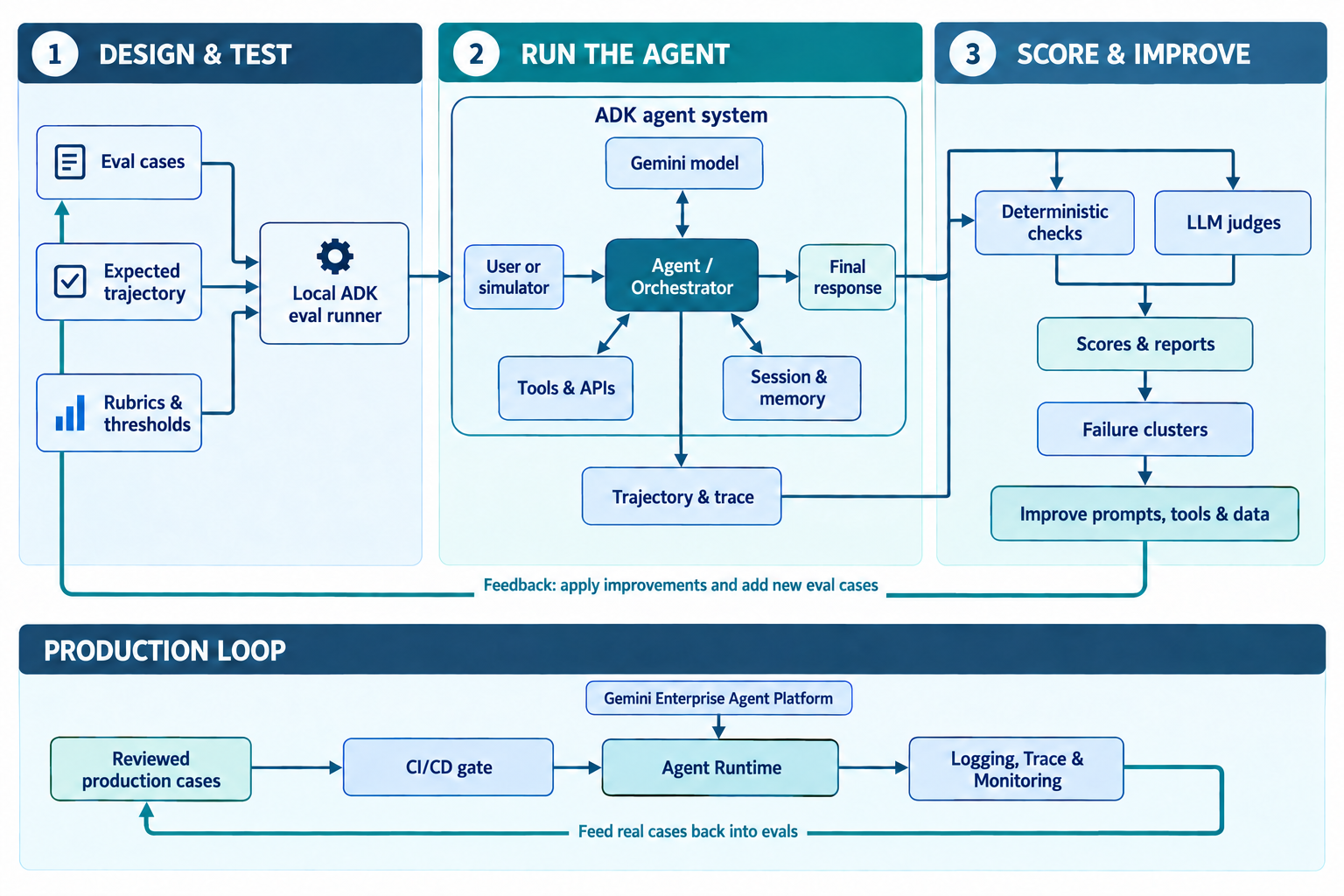
Figure 2. The evaluation architecture examines both outputs and execution evidence. Local cases provide fast development feedback; production traces and reviewed cases expand the suite with real behavior. Select the image to enlarge it.
Agent Runtime is the managed execution environment. Cloud Storage can stage the deployment artifacts. IAM controls which principals and runtime identities can access models, tools, and data. Evaluation services score the resulting behavior, while logging and tracing supply the evidence needed to diagnose failures.
The underlying API resource may still appear as ReasoningEngine for backward compatibility even though the product experience calls it Agent Runtime. Google explains this naming history in the Agent Runtime documentation.
Deployment is not the finish line
When an ADK application runs locally, it commonly uses in-memory session state. When deployed through the integrated Agent Runtime path, it can use managed session resources for persistent multi-turn interactions. This difference matters for evaluation: state, identity, permissions, network behavior, and production tool dependencies can expose issues that never occur in a local test.
That leads to a simple rule:
Evaluate locally for development speed, and evaluate the deployed system for production truth.
A production evaluation lifecycle should include:
- Define business outcomes and unacceptable behaviors.
- Build a human-reviewed golden set of high-value cases.
- Add deterministic trajectory tests for critical tool workflows.
- Add semantic, rubric, groundedness, and safety metrics.
- Run fast checks during development and CI/CD.
- Deploy an immutable agent version.
- Generate and review broader scenarios.
- Run multi-turn simulations against the deployed version.
- Analyze scores, clusters, and traces.
- Apply a targeted prompt, tool, data, or infrastructure fix.
- Re-run both the failed cases and the broader regression suite.
- Monitor quality after release and feed reviewed production cases back into the suite.
Common mistakes to avoid
Evaluating only the final answer
An agent may produce the right prose after using the wrong tool or violating an approval step. Always test trajectory for consequential actions.
Treating one exact response as the only correct response
Generative systems can express the same correct answer in many ways. Use semantic or rubric-based evaluation when wording is not contractually fixed.
Using only synthetic test cases
Simulated users expand coverage, but they can reproduce the assumptions of the models that generated them. Combine synthetic scenarios with domain-expert cases, incidents, support logs, and carefully governed production traces.
Treating an LLM judge as absolute truth
Judge outputs must be calibrated. Review samples of passes and failures, make rubrics specific, and use multiple evaluators or human review for high-risk decisions.
Fixing every failure in the prompt
The root cause may be a vague tool schema, missing validation, poor data, permissions, timeouts, or an unreliable dependency. Use traces and clusters to fix the correct layer.
Optimizing only the aggregate score
A high average can hide a severe failure in a small but important segment. Track critical scenarios separately and require hard gates for security, safety, authorization, and irreversible actions.
Final takeaway
Agent evaluation is not simply a comparison between generated text and a reference answer. It is a structured method for measuring whether the agent understands the task, follows the right process, uses tools correctly, remains grounded and safe, and completes the user’s goal across realistic conversations.
ADK provides the developer feedback loop: repeatable test cases, trajectory checks, response comparisons, rubrics, and multi-turn metrics. Gemini Enterprise Agent Platform extends that loop with managed execution, scenario generation, simulated users, trace-based scoring, dashboards, and automatic failure clustering.
Together, they form a quality flywheel:
Build → Evaluate → Deploy → Simulate → Analyze → Improve → Re-evaluate
The most valuable outcome is not a single evaluation score. It is an evidence-based engineering process that makes every new agent version safer, more reliable, and easier to operate.
References
- ADK: Why evaluate agents?
- ADK evaluation criteria
- Gemini Enterprise Agent Platform: Agent evaluation
- Simulate agent behavior
- Analyze evaluation results and failure clusters
- Agent Runtime overview
- Develop and deploy an ADK agent on Agent Runtime