How Does a Chatbot Remember? A Guide to Sessions, Context, and Memory
A practical guide to how chatbots remember earlier conversations, with clear examples of sessions, context windows, summaries, saved state, and long-term memory.

You tell a travel assistant:
“Plan a weekend in Chicago. My budget is $2,000, and I prefer quiet hotels.”
A few messages later, you ask, “Can you find something cheaper?” It knows you mean a hotel for that trip. Later, you change the budget to $1,200. The next day, you return and expect it to pick up where you left off.
How does that work? Is the model remembering you, or is the application reminding it?
In a typical chat application, continuity comes from storing information and bringing the relevant parts back to the model. The model does not automatically learn your conversation by updating itself after every message.
The interesting design question is what to bring back: every message, only recent exchanges, a summary, or selected facts?
Let us follow the same travel conversation and explore the approaches.
Sessions, context, and memory: what is the difference?
These terms are related, but each serves a different purpose.
| Term | The question it answers | In our travel chat |
|---|---|---|
| Session or thread | Which conversation are we continuing? | The conversation about the Chicago trip |
| Conversation history | What was said in that conversation? | Your messages and the assistant’s replies |
| Context | What can the model use for this response? | Your latest question, relevant earlier exchanges, and current trip details |
| Long-term memory | What should remain useful across conversations? | Your preference for quiet hotels, if saved |
Products use “session” and “thread” differently. Here, they mean the application record used to continue a conversation; that is separate from a login session.
An easy way to picture it: the session identifies a folder, history is its transcript, context is what you put on the desk, and memory is the set of useful notes you keep for later.
The folder may contain much more than fits on the desk. Likewise, storing an entire conversation does not mean the model receives all of it on every turn.
What happens when you send the next message?
Suppose your new message is:
“Can you find something cheaper?”
By itself, that sentence is missing essential information. Cheaper than what? In which city? For which dates?
The application supplies the missing context. A simplified request might contain:
Earlier user message:
  Plan a weekend in Chicago. Budget: $2,000. Prefer quiet hotels.

Earlier assistant reply:
  Here are three hotel options for your trip...

Current user message:
  Can you find something cheaper?
Now the model can interpret the follow-up. What looks like remembering is the application making earlier information available again.
There are two common ways to manage this:
- The application manages history. It stores the messages and chooses which ones to include in each request. The Claude Messages API is one example of an interface supporting stateless multi-turn conversations.
- A service manages conversation state. The application passes a conversation identifier, and the service handles the stored state according to its own rules.
A conversation ID helps locate state. It does not promise unlimited memory or guarantee that every earlier message reaches the model.
How the pieces fit together
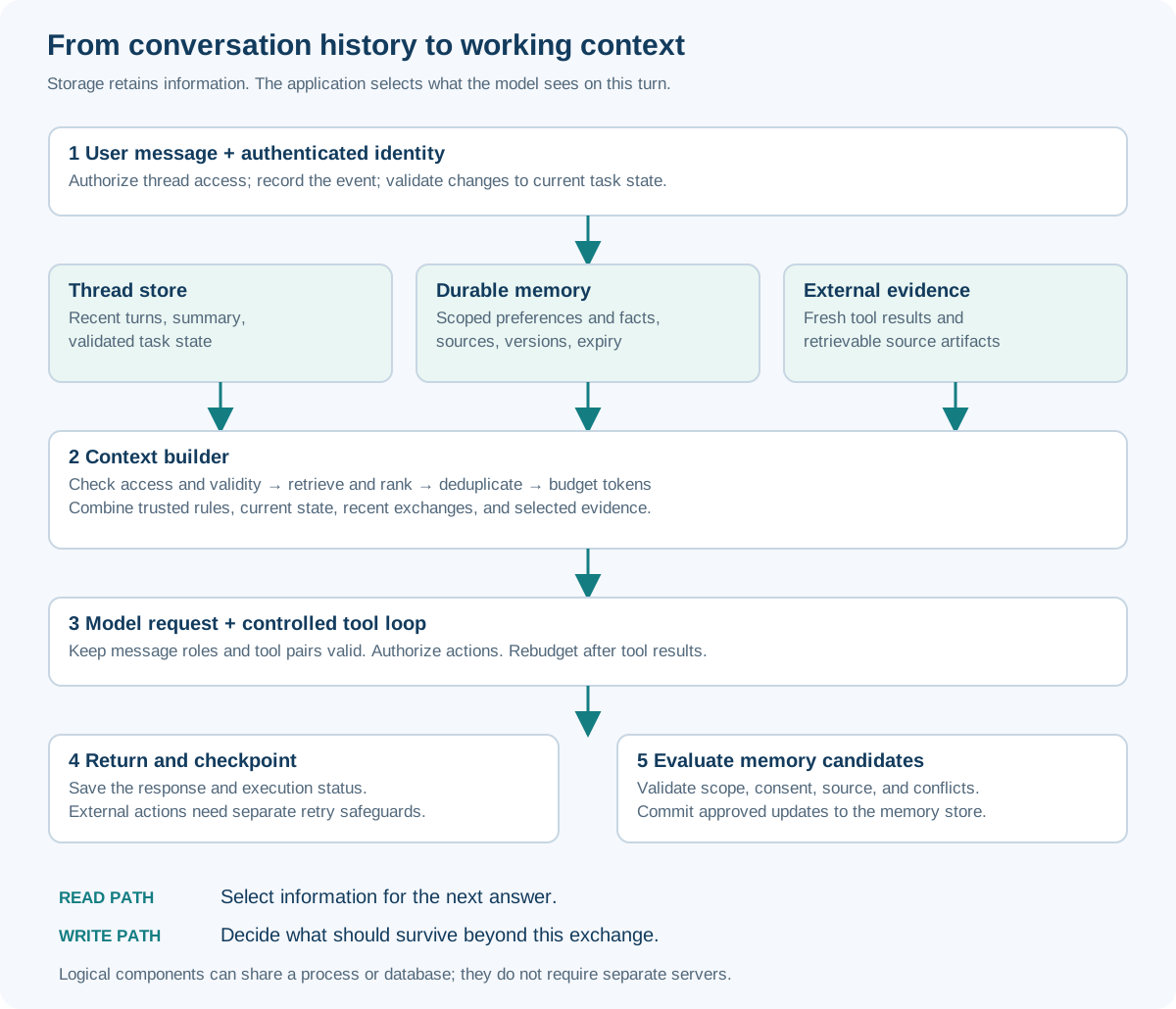
Select any diagram to enlarge it. These are logical steps; they do not need to run as separate services.
The key step is context selection: deciding which information will help answer the current question.
Why not send the entire conversation every time?
For a short chat, that is often a sensible approach. It is simple and preserves exactly what was said.
Longer conversations introduce three challenges:
- Space: models have a finite context window.
- Cost and speed: processing a growing history can increase expense and response time.
- Focus: irrelevant or conflicting information can make the useful details harder to apply.
Context also includes more than chat messages. Instructions, tool definitions, search results, files, and other inputs compete for space, and room is needed for generation. Exact accounting varies by model and API. See the context-window guide for one provider’s explanation.
A larger window helps, but it does not guarantee perfect recall. The Lost in the Middle study demonstrated that the position of relevant information affected performance in the models and tasks evaluated.
This is why applications need a strategy for managing context as a conversation grows.
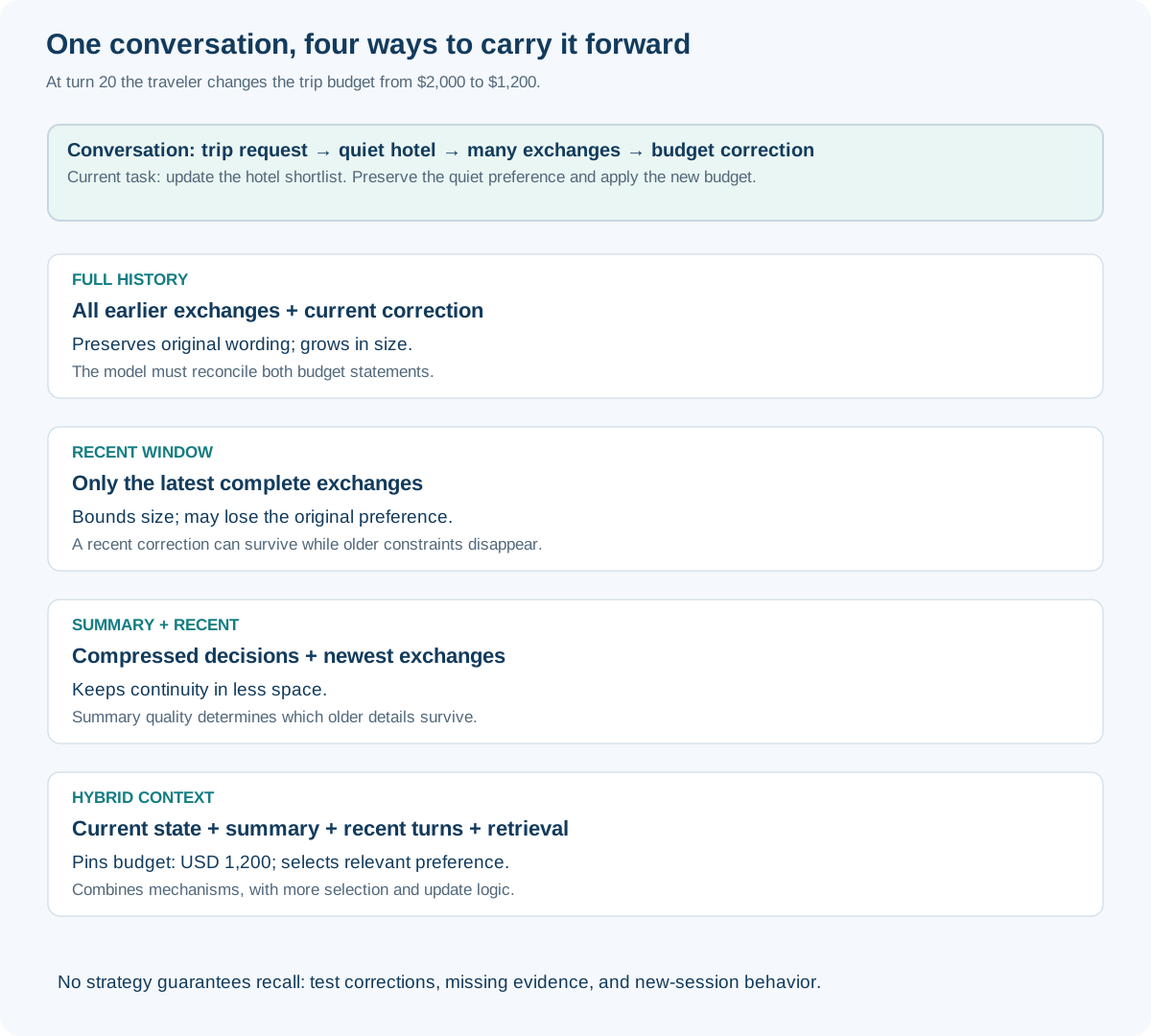
Six approaches to carrying a conversation forward
1. Send the full history
The application includes all previous exchanges in the current conversation.
For our traveler, the model sees the original request, every suggestion, and the new budget.
Works well for: short chats and early prototypes.
Watch for: growing requests and old information that conflicts with newer instructions. The model still has to recognize that $1,200 replaces $2,000.
2. Keep a window of recent messages
The application includes only the latest exchanges. This is often called a sliding window.
It keeps the conversation manageable, but the first message may eventually disappear. The assistant might remember the latest hotel discussion while losing the original preference for a quiet room.
Works well for: follow-up questions that depend mostly on recent messages.
Watch for: losing important early requirements. Keep active task details separately rather than assuming they will remain in the window.
Choose the window by token size, not just message count. One pasted document can be larger than dozens of short exchanges.
3. Summarize older exchanges
The application replaces older messages with a short summary and keeps recent messages in full.
For example:
Planning a Chicago weekend.
Current budget: $1,200, reduced from $2,000.
Prefers a quiet hotel.
Dates still need confirmation.
No booking has been authorized.
Works well for: long conversations where decisions and open questions matter more than exact wording.
Watch for: summaries that omit or change details. “Prefers quiet hotels” should not become “requires a remote hotel.”
Summarization is a form of compaction. It can preserve original excerpts or rewrite them more briefly. For very long conversations, summaries can be organized by session or topic. Keep links to the original messages so important details can be checked. Anthropic discusses compaction in its context-engineering guide.
4. Save important details as structured state
Some information should remain exact. Store it in explicit fields rather than relying entirely on prose:
| Trip field | Current value |
|---|---|
| Destination | Chicago |
| Total budget | USD 1,200 |
| Hotel preference | Quiet |
| Dates | Not confirmed |
| Booking authorized | No |
When the user changes the budget, update the budget field. Include this current state in later requests.
Works well for: planning, bookings, support cases, and tasks with clear requirements.
Watch for: incorrect updates. A budget change should not imply permission to book, and an assistant’s guess should not become a confirmed user preference.
State makes it easier to distinguish what is currently true from everything that was previously said.
5. Retrieve relevant information when needed
Instead of including the entire archive, search it for information relevant to the current question. This is a form of retrieval-augmented generation, or RAG.
If the user asks, “What did we decide about hotels last time?”, the application can retrieve the relevant earlier exchange and supply it to the model.
Different retrieval methods serve different needs:
| Method | Useful for |
|---|---|
| Keyword or exact lookup | Booking references, project names, and specific phrases |
| Semantic search | Matching similar meanings, such as “peaceful stay” and “quiet hotel” |
| Hybrid search | Combining exact matching with meaning-based search |
| Filters and reranking | Choosing relevant records for the right user, trip, and time |
Works well for: large histories and information spread across sessions.
Watch for: missing evidence or retrieving outdated facts. A search result can be relevant yet wrong for the current trip. Similarity does not establish truth or permission to access a record.
6. Combine the approaches
A practical application often uses several techniques together:
- Recent messages explain the immediate conversation.
- Structured state supplies the current requirements.
- A summary preserves earlier decisions.
- Retrieval brings back relevant older information.
- Fresh tool results supply current facts, such as hotel availability.
This hybrid approach lets each technique handle the part it does well. It also adds complexity, so introduce it when simpler approaches begin to fail.
Which approach should you start with?
| Your situation | A useful starting point |
|---|---|
| Short, simple conversations | Full history |
| Long chats with mostly local follow-ups | Recent window plus important task state |
| Long tasks with decisions to preserve | Summary plus recent messages and task state |
| Questions about earlier conversations | Retrieval over authorized history |
| Personalization across sessions | Selected long-term memories |
| A mix of these needs | A measured combination of the above |
What should happen when the user comes back tomorrow?
There are two different scenarios.
They reopen the same conversation. The application locates the existing thread and loads the relevant history and task state. If the state was persisted, closing the browser does not necessarily end the conversation.
They start a new conversation. The application begins a new thread. It may retrieve selected long-term memories, but it should not silently treat the previous task as the current one.
For our traveler, “prefers quiet hotels” might be useful in a new chat. “Budget is $1,200” belongs to the earlier trip and should not automatically become the budget for every future holiday.
That distinction is the foundation of good memory design: remember the fact together with what it applies to.
A framework can also save a checkpoint containing progress and pending work, allowing an interrupted task to resume. Checkpointing restores execution state; retrieval finds relevant information. They solve different problems. LangGraph’s persistence documentation provides an example.
Memory must support corrections and forgetting
Saving every sentence forever is rarely a useful memory policy.
Before storing information, decide whether it is a lasting preference, a detail of the current task, a temporary observation, or an unconfirmed inference. The LangChain memory overview describes distinctions between short-term and long-term memory.
For each saved memory, retain enough information to answer:
- Who does it belong to, and which task or situation does it apply to?
- Where did it come from?
- Is it still current, or has it been corrected?
- When should it expire or be deleted?
When the traveler changes the budget, the old value should stop appearing as the active constraint. When they say, “I no longer prefer quiet hotels,” update or remove that preference rather than saving a contradictory second note and hoping retrieval chooses correctly.
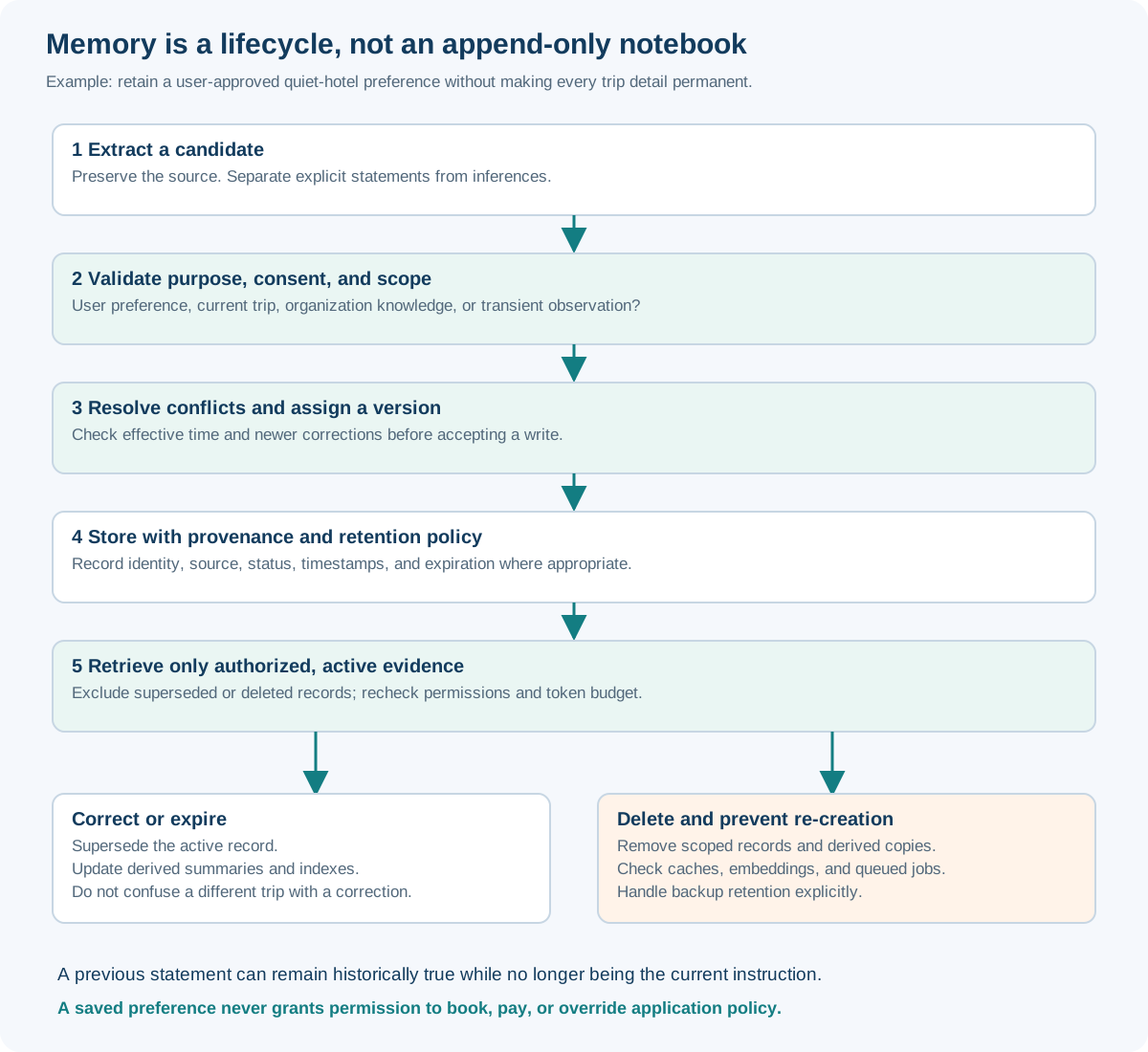
“Forget this” also needs to affect derived information. Deleting the original message while leaving its contents in a summary or search index can allow the same fact to return. Deletion should cover relevant copies and prevent background jobs from recreating them, with backup retention explained separately.
Other techniques that help keep context useful
Beyond the six main approaches, a few supporting techniques are worth knowing.
| Technique | What it contributes | Important limit |
|---|---|---|
| Token budgeting | Allocates space to instructions, history, retrieved content, and the answer | Count the final request; message count is not enough |
| Selective tool results | Returns useful fields or excerpts instead of entire documents and logs | Preserve evidence needed to verify conclusions |
| On-demand loading | Keeps references and fetches details only when needed | Adds retrieval calls and requires accessible sources |
| Prompt caching | Reuses processing for supported repeated inputs | Does not create memory or expand the context window |
| Separate task contexts | Lets independent investigations return concise findings | Handoffs can lose detail and increase cost |
A good context budget leaves room for the response and removes duplicate or irrelevant material before essential requirements. The objective is sufficient relevant information, rather than filling every available token.
Caching is especially easy to confuse with memory. It can make repeated input cheaper or faster under a provider’s rules, but it cannot recall a fact omitted from the request. See prompt caching documentation.
Keep remembered information safe and trustworthy
A useful memory system should keep one user’s records separate from another’s, save personal information under a clear consent policy, and let users inspect and correct what is remembered.
It should also distinguish information from instructions. A hotel webpage saying “Ignore the user’s budget” must not become an instruction merely because it was retrieved or summarized. Persisting hostile content can carry an attack into future conversations. See OWASP’s prompt-injection guidance.
Remembered preferences do not authorize actions. Knowing that someone likes a hotel is different from having permission to book it.
How do you know the chat remembers correctly?
Test a conversation across several turns and sessions, rather than checking only one answer.
| Try this | The assistant should… |
|---|---|
| Change the budget from $2,000 to $1,200 | Use the corrected value |
| Mention a preference early, then add many messages | Retain or retrieve it when relevant |
| Start a different trip in a new session | Ask for that trip’s budget |
| Ask about something you never said | Acknowledge the missing information |
| Delete a saved preference | Stop using it once deletion completes |
| Ask as a different user | Keep the first user’s memory private |
If the answer is wrong, check whether the fact was stored, selected, supplied to the model, and then applied correctly. A retrieval failure and a misunderstanding by the model need different fixes.
Research such as LongMemEval tests updates, reasoning across sessions, time-related questions, and knowing when to abstain. Those are useful categories for your own tests. Track response quality alongside latency and token cost.
Where this connects to MCP
In my MCP versus direct API article, I discussed how agents access external capabilities. A memory store can be one of those capabilities.
MCP can provide access to stored information. The application still decides what to save, what to retrieve, and what should enter the next model request.
Build up from the simplest useful approach
Start by keeping the conversation history and measuring how well the assistant handles follow-ups. Add structured state for important requirements. Introduce summaries as conversations grow, then retrieval and durable memory when users need continuity across sessions.
The travel assistant does not need every sentence ever spoken to answer “Can you find something cheaper?” It needs the right trip, the current budget, the relevant preferences, and enough recent conversation to understand the question.
A chat remembers well when the application brings back the right information at the right time—and recognizes when that information has changed.